SOFTWARE: mapguide white paper: a network-centric GIS application architecture for publishing and accessing geodata


1. Introduction

Network-centric GIS is an application architecture for Geographic Information Systems (GIS) born out of a vision to embrace HTTP and TCP/IP standards. This new and innovative technology delivers map-based applications for wide distribution across organizations and enterprises. It does so more effectively, more efficiently, and less expensively than historic GIS application architectures. Network-centric GIS introduces a new paradigm for geographically enabling a broad variety of mapping applications in key government and business industries.

This paper defines the properties of network-centric GIS and provides an overview of Autodesk MapGuide, the first network-centric Geographic Information System for publishing and accessing geodata. We define three fundamental requirements for network-centric GIS and draw from specific examples of the Autodesk MapGuide environment. We also explore network-centric application development to show how technologies, such as Autodesk MapGuide, are used to quickly build and deploy wide area GIS applications. We find these applications are robust, functional, cost effective, and easily supported.

2. Background

During the past several decades, computing application architecture has evolved through two distinct eras. Initial applications were based on host-centric systems, with hardware platforms dominated by mainframe computers and terminal based networks. Following the introduction and broad acceptance of the PC in 1981, application architectures became desktop-centric, with a large number of applications residing on the end-user desktop, connected to local area networks for file and peripheral sharing.

Host-centric architectures were characterized by powerful, centrally located host or mainframe computers that performed all of the computations, data storage and management, and screen interface generation and interaction. End-users were provided with terminals in order to interact with and share the resources of the host. End-user terminals had no capability to save information locally, perform local processing, or directly control the interface with which they interacted.

Desktop-centric architectures replicate all of the application processing, screen management, user interface generation and interaction, and data management functions on each user’s local machine (i.e. personal computer). While the adoption of local area networks provides some sharing of data and peripherals, application architectures remain very desktop-heavy.

Today, as a result of the broad adoption and acceptance of network and application standards introduced and supported by the Internet, the information systems world is entering a third era of computing, an era based on network-centric application architectures. For the development and implementation of applications to multiple users, network-centric applications are exhibiting significant and measurable benefits combined with high returns on investment following their deployment. Network-centric applications exhibit dramatically lower initial deployment and ongoing support costs, more efficient use of network computing resources, and enhanced access to corporate data resources. Applications that are network-centric also display higher levels of application performance, feature new distributed processing features, and justify the implementation of specific technologies such as GIS across a broader audience of end-users.

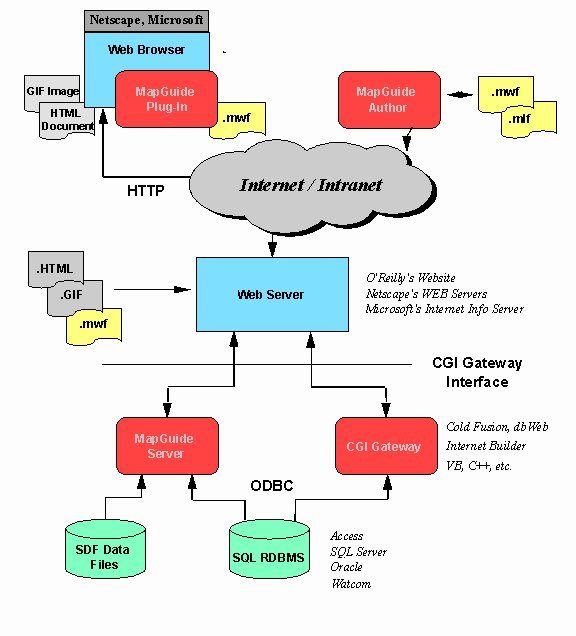
Network-centric architecture is having a dramatic impact on the GIS industry. For the first time, cost-effective, enterprise wide mapping and geographically enabled applications can be deployed and supported to large numbers of end-users. To understand the benefits of this new paradigm for GIS, it is important to first define and understand the characteristics of network-centric architectures as applied to geographic information systems. In the next sections, we will define the requirements for network-centric GIS and use the Autodesk MapGuide architecture as displayed in Figure 1. as a model for showing how these systems are implemented.

Figure 1

Figure 1

3. Requirements for network-centric GIS

In order to deliver on the promise of a network-centric paradigm, GIS technologies must meet technical requirements in three categories:

  1. Internet Standards Support
  2. Distributed Services Architecture
  3. Thin Client / Intelligent Document Based
These three criteria are explained in more detail below.

3.1. Internet / Intranet Standards Based

Network-centric GIS applications embrace the networking communication and file transfer protocols of the Internet; TCP/IP (Internet protocol) and HTTP (hyper-text transfer protocol). They adopt standard HTML (hyper-text markup language) browsers as application shells, making this the common enabling architecture for sending files, text, and bitmap graphics for reports, tables, and graphs, and for housing special technologies such as the Autodesk MapGuide plug-in, that handle special data types such as GIS/mapping content.

Support for communications standards is important. Conformance to TCP/IP and HTTP means that network-centric applications can connect to data anywhere, inside or outside an organization, between companies and customers, companies and suppliers, and companies and their business partners. This level of network protocol standardization lays the foundation for all of the other requirements and resulting benefits that network-centric architectures deliver.

The use of HTML for "report-oriented" data provides a cross-application standard. Rather than expending resources on the development of non-core technologies, GIS technology providers can focus on what they do best. Customers can select the best HTML tools and technologies required to deliver their particular solution.

To deliver a complete solution to the client, application developers must be able to integrate a network-centric architecture with GIS technology. Autodesk MapGuide supports accepted and emerging standards in these areas at both the client and the server levels.

Table 1 summarizes the standards for enabling technologies and application delivery, extension and integration which are necessary for a network-centric architecture.

Enabling Technologies
Network communications protocol TCP/IP
Document and file transfer HTTP
Document display and applications integration HTML
Applications Delivery
Client-side integration ActiveX / Plug-in
Server-side integration CGI or API (gateway server)
Applications Extension and Integration
Client-side extension HTML, Java and JavaScript support


3.2. Distributed Services Architecture

A distributed services architecture is one that provides active, executable processes at both the desktop and the server; this balances the processing burden between the two. Processing tasks, such as the dynamic extraction of geodata subsets to data sampling and analysis, are examples of GIS functions that are logically performed at the server, rather than at the desktop. The determination of spatial query sets and the application of rendering attributes by scale, or thematic properties based on attribute values, are tasks more suited to execution at the client’s desktop.

The distributing of processing between the desktop and the server maximizes the utility of existing computer hardware resources. The placement of more data-intensive tasks at the server allows application design to support other network-centric requirements (e.g. thin client and intelligent document). It also positions the processing routines for these tasks on the same physical computer, or in a scaleable model - the Local Area Network, on which the data exists; this significantly reduces bandwidth requirements and enhances performance. This allows for easier estimation of the server sizing requirements necessary to deliver optimum performance across the network; and, there is no need to invest in additional desktop (i.e. client) processing power within the enterprise. An increase in server performance results in application benefits across the entire user base, without the need to change or modify desktop hardware.

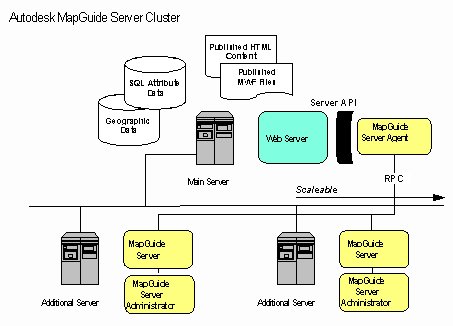
Figure 2

Figure 2

Distributed services architecture should also be scaleable in order to take advantage of existing infrastructures and provide the obvious benefits of this application framework.

Autodesk MapGuide Server is a multi-threaded, thread-safe, server application consisting of three separate executable components. They include the Autodesk MapGuide Server Agent, the Autodesk MapGuide Server, and the Autodesk MapGuide Server Administrator. They are shown, configured as a scaleable cluster in Figure 2.

The ability to easily scale up a server to multiple CPUs (i.e. central processing units) without changing the software is an important requirement for network- centric architecture. This allows for the flexible and efficient matching of a network’s performance requirements with the amount of processing power required at the server.

Finally, distributed services architecture in GIS must provide dynamic access to spatial data: the ability to efficiently request and retrieve a subset of large geographic data sets "on-demand." Dynamic access makes this architecture sensitive to the availability of data transfer rates (i.e. bandwidth-sensitive). Administrators have the ability to create different map applications according to network bandwidth conditions (internal direct connect vs. dial-up or mobile).

4. Thin Client / Intelligent Document Architecture

4.1. Thin Client

The term "thin client" is often used to describe networked computers with no local disk storage devices, a limited amount of system memory and no local peripherals. Thin client applications are often described in the context of the Java programming language. However, this definition of the term is too narrow, and tends to confuse an applications architecture with a programming language. More importantly, a broader and clearer definition of the term allows its application across a broad range of existing network and computing hardware, delivering significant benefits without needing to replace existing hardware infrastructures.

In the context of this paper, the term thin client refers to applications that install and operate on the end-user’s desktop computer with far fewer files than are common today and perform with a greatly reduced amount of local data storage and management than is common today.

This objective is achieved by leveraging the system services provided by a common HTML browser, balancing the processing through the use of a distributed services architecture, and combining document and application data together such that it can be centrally managed and deployed as an intelligent mapping document.

As applied to network-centric GIS, it is better to have fewer executable application files on the end-user’s desktop. This is the key to lowering the cost of ongoing maintenance, support, training, and ownership. Conventional mapping systems today typically install over 1000 files on the local desktop. The Autodesk MapGuide plug-in requires the installation of only one file: the Autodesk MapGuide plug-in itself.

For distributed applications, end-user desktops should not be burdened with multiple file directories of application specific code. If application specific code is stored on the end-user’s desktop, then it becomes difficult to maintain, update or support the application.

4.2. Intelligent Document

Distributed mapping is the ability to view one map document whose subsets of map data (i.e. layers) are served from different servers. This allows for new and more flexible ways to implement map-enabled applications. For example, with Autodesk MapGuide, an organization could build an application that overlays corporate data served from internal servers on census geography served from a service bureau. This would deliver the key advantage of allowing an organization to realize the benefits of map-enabled applications without the burden of building, managing, and maintaining it’s own in-house census database.

Maintaining all of this meta-information in one file makes it much easier to support multiple users, since a single file update or re-fresh can update a complete application and its associated data.

An intelligent document is this single file. An intelligent document embeds within itself, application specific meta-information in addition to application data. It includes information about how the client application that loads the document behaves during the presentation of the document.

Autodesk MapGuide employs an intelligent mapping document called a "Map Window File" (MWF). The MWF is a self-contained file that contains general map properties, security information, map layer properties, raw map data, and user interface specifications.

User-interface specifications includes the pop-up menu system applied by the Autodesk MapGuide plug-in when viewing a map. It allows users to select applications of interest and have the specific user-interface for the application automatically delivered with the map.

Map layer properties include server addresses, database file definitions, attribute key field names and other types of meta-data which allow the Autodesk MapGuide plug-in to independently request spatial or attribute data as it is required from wherever it resides. Users can remotely access any number of Autodesk MapGuide Servers to retrieve geographic data and related map applications. Maps can include multiple layers of data originating from different servers on the network. This provides a distributed mapping capability that has not been previously available.

4.3. Creating the Intelligent Document

The Autodesk MapGuide Author is a visual authoring tool designed to create and manage MWF files. Since Autodesk MapGuide Author is also network-centric, it displays mapping data in exactly the same way that Autodesk MapGuide plug-in displays the data; this provides the user with a WYSIWYG (i.e. what you see is what you get) interface for authoring. The authoring tool can also be used remotely. For example, an end-user might contract with a service bureau to manage and serve mapping data for a specific application. However, the end-user could maintain control of the application by using the Autodesk MapGuide Author from his remote location to create and manage MWF files residing and being served at the service bureau’s site.

The use of a visual authoring tool, like Autodesk MapGuide Author, provides additional benefits to the development and deployment of map-enabled applications. Since maps, map document menus and other application specifics are authored visually without programming, development and support personnel require less training to create and maintain applications. Remote application administration facilitates a support staff that fits within existing corporate structures. Managers can also centralize their support center while maintaining distributed clients and applications.

Table 2 summarizes the requirements of network-centric GIS by category. Any Geographic Information System claiming the benefits of a network-centric architecture must, necessarily, meet the fundamental requirements of this paradigm. Since Autodesk MapGuide was developed as a network-centric technology, it is positioned to maximize the benefits of a new age in computing architecture. It is also the first GIS platform of its kind, and it sets the standard for a world of distributed map development tools.

5. Network-centric GIS Applications Development

Network-centric GIS provides several distinct advantages to individuals and groups wishing to develop a GIS or map-enabled application for deployment within or outside their organization.

First, network-centric architectures use Internet standards as a foundation; thus, the developer builds an application within an open, standards-based and widely adopted networking environment. Typically, the developer will already have access to an internal network and will be able to use this backbone in addition to the existing server hardware and software.

The Autodesk MapGuide plug-in provides a mapping component for client applications that is called to execute full size or within an HTML frameset. As a browser opens an HTML document that has a line referencing a "Map Window File" (MWF), parameters following the file name alter the plug-in’s default state. These parameters support display of the map with or without tool bar, status bar, or active legend, and they provide additional extensions for active layers, URL links and other configuration information.

Using the Autodesk MapGuide Author, the developer has the flexibility to configure a pop-up menu system which adds new features to the client plug-in. The pop-up menu accesses server based processes as well as configures client based actions to interact with spatial objects, communicate with the server, navigate the map window, and perform other application specific functions.

The developer can also configure the Autodesk MapGuide Server to link with third party software to implement specific features necessary for the vertical application desired. The developer has complete flexibility in the selection of industry tools to build CGI or API- based extensions which perform SQL (structure query language) access, dynamic HTML generation, or specialized GIS analyses.

At the client-end, tight integration exists between Autodesk MapGuide plug-in and the emerging JavaScript standard. Using JavaScript and Java applets embedded within HTML documents, the developer can allow for two-way communication between the end-user’s interaction with HTML source and the Autodesk MapGuide software’s internal functionality. This gives the developer several options for providing custom features to the client.

Autodesk MapGuide provides a core mapping component at the client and the server that allows for fast development and deployment. It has graphical tools for configuration and it integrates with open and evolving standards, ensuring that investments in this technology will continue to provide returns on investment for a long period of time.

6. Summary

Network-centric GIS represents a significant new era for Geographic Information Systems and map-enabled applications. Based on the standards of the Internet, network-centric architectures deliver significant and measurable benefits for companies and organizations that want to distribute maps, spatial data, or GIS technology to multiple desktops within a department or throughout an organization.


7. The Autodesk Advantage

Buying Autodesk products means buying more than just software. It’s a decision to join millions of professionals worldwide sharing common business interests and goals – a virtual corporation of people, businesses, government agencies, and educational institutions. Autodesk software is used in more than 118 countries and is available in 18 languages. In addition, Autodesk develops its software solutions in 11 research centers, and our software manufacturing process is ISO 9002-certified

Over 5,000 applications from more than 2,300 Autodesk Registered Independent Application Developers ensure that no matter what a mapping or GIS workgroup’s specific needs may be – integrating many data types from different sources, converting data from one format to another, finding appropriate data for your project, making presentations that highlight subsets of your data, editing or changing data – a specific Autodesk solution exists to meet them. Whatever the application, Autodesk provides a flexible suite of tools to manage GIS data so the user is more productive and competitive.

From Seattle to Stockholm, from Singapore to São Paulo, customers are never far from knowledgeable Autodesk assistance. Autodesk provides extensive training and support resources, including more than 4,900 Authorized Autodesk Dealers, Autodesk System Centers and Distributors, more than 800 Authorized Autodesk Training Center (ATC®) sites as well as educational and user groups, and three on-line CompuServe® forums. Autodesk also offers a variety of GIS data management services through Autodesk Consulting Partners. Autodesk solutions deliver it all: great products, worldwide distribution and support, and comprehensive training. Autodesk and its partners are ready to deliver solutions that meet your needs today and tomorrow.

Business Geographics are the main Authorized Dealer for Autodesk MapGuide in the United Kingdom and Ireland.

8. References


© Copyright Business Geographics Limited